Paid and Free College Search Tools: Which One to Use and When
Sep 03, 2026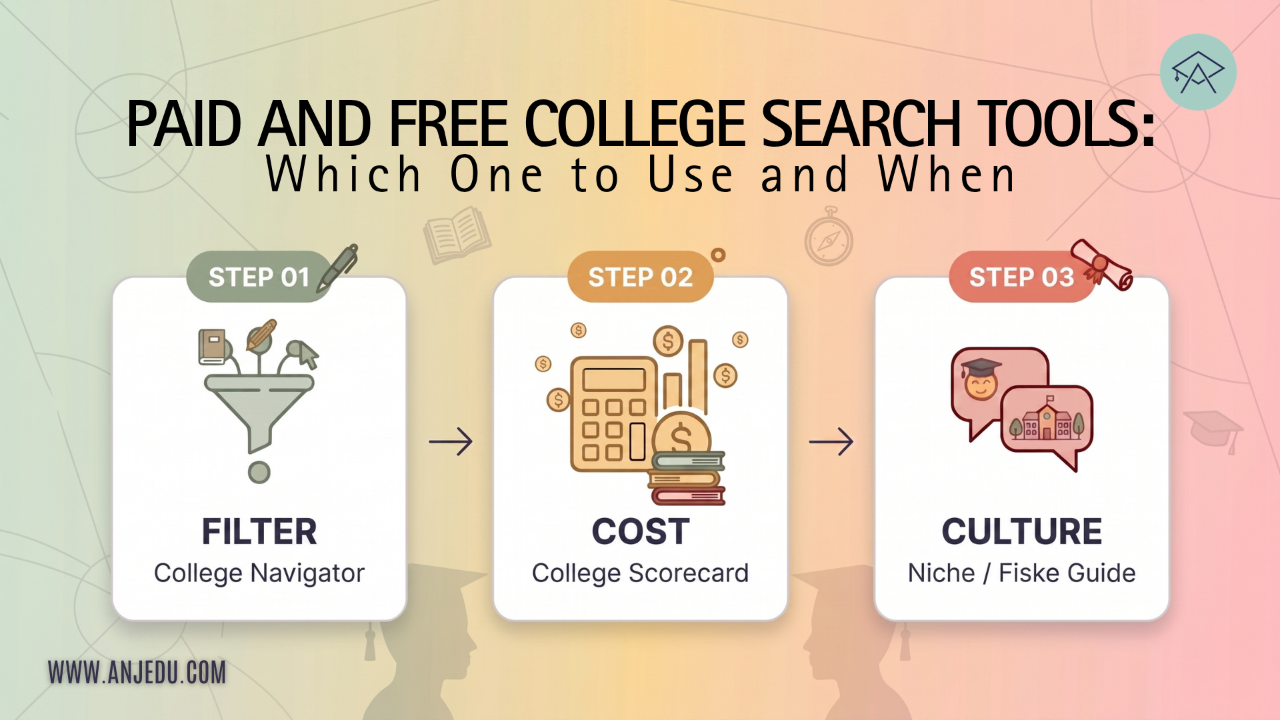
Most families searching for colleges online eventually land on a site that asks for contact information, recommends a handful of schools, and calls the results a match.
That does not mean free college search sites are bad. It does mean you should understand how each tool works and how it is funded. Some sites sell advertising, sponsored placement, or recruitment services to colleges. Others, including some of the most useful tools available, are government databases with no college marketing built into the search results.
And when you are getting started, there is no need to pay for a good college search tool.
The other thing families get wrong is treating college research as one job.
It is really four:
- Filtering thousands of colleges into a manageable set of candidates
- Estimating what each college may actually cost your family
- Learning what it might be like to attend
- Keeping all the information organized
No single free tool does all four well. Using the wrong tool for a particular job is how families end up with a college list built on rankings, marketing copy, or incomplete information.
First, we'll show you which free tool does which job. Then we'll share a paid resource we think is worth using and an option for families who want the entire initial college-list-building process done for them.
If you have not defined your student's preferences yet, do that first, because filters are only as good as what you feed them. Our guide to How to Build a Balanced College List walks through that step.
On this page
What Are the Best Free College Search Tools? The Short Answer
1. College Navigator does the filtering. It uses federal data, offers detailed filters, lets you save favorites, and exports results to a spreadsheet. Start here.
2. College Scorecard helps answer the outcomes and money questions. Use it to examine net price, federal student debt, and post-college earnings, including earnings and federal loan debt for particular fields of study.
3. BigFuture is the easiest of the three for many students to browse. It has quizzes, college exploration and career tools in a student-friendly interface. Its college profiles rely primarily on information supplied by colleges, and its optional Student Search Service is also part of a broader college-recruitment ecosystem.
4. Niche is useful for understanding student experience and culture. Its grades combine quantitative data and student feedback, so use them as one input rather than treating a single letter grade as a verdict on a college.
5. CampusReel and YouTube can give you student perspectives that polished admissions tours may not. Just remember that individual videos are anecdotes, not representative samples.
6. The college's own website is still indispensable. It is the place to verify current majors, degree requirements, deadlines, faculty, policies, housing and other details.
7. A college's net price calculator gives you the best school-specific estimate of what that institution may cost your family. It is still an estimate, not a financial-aid offer.
8. For merit aid, Jeff Selingo's Buyers and Sellers List is a useful additional resource. It can help identify colleges that are more or less likely to use institutional merit aid aggressively, but it is a rough guide rather than a scholarship predictor.
9. One paid individual resource is worth considering: the Fiske Guide to Colleges. Check your public library before buying it.
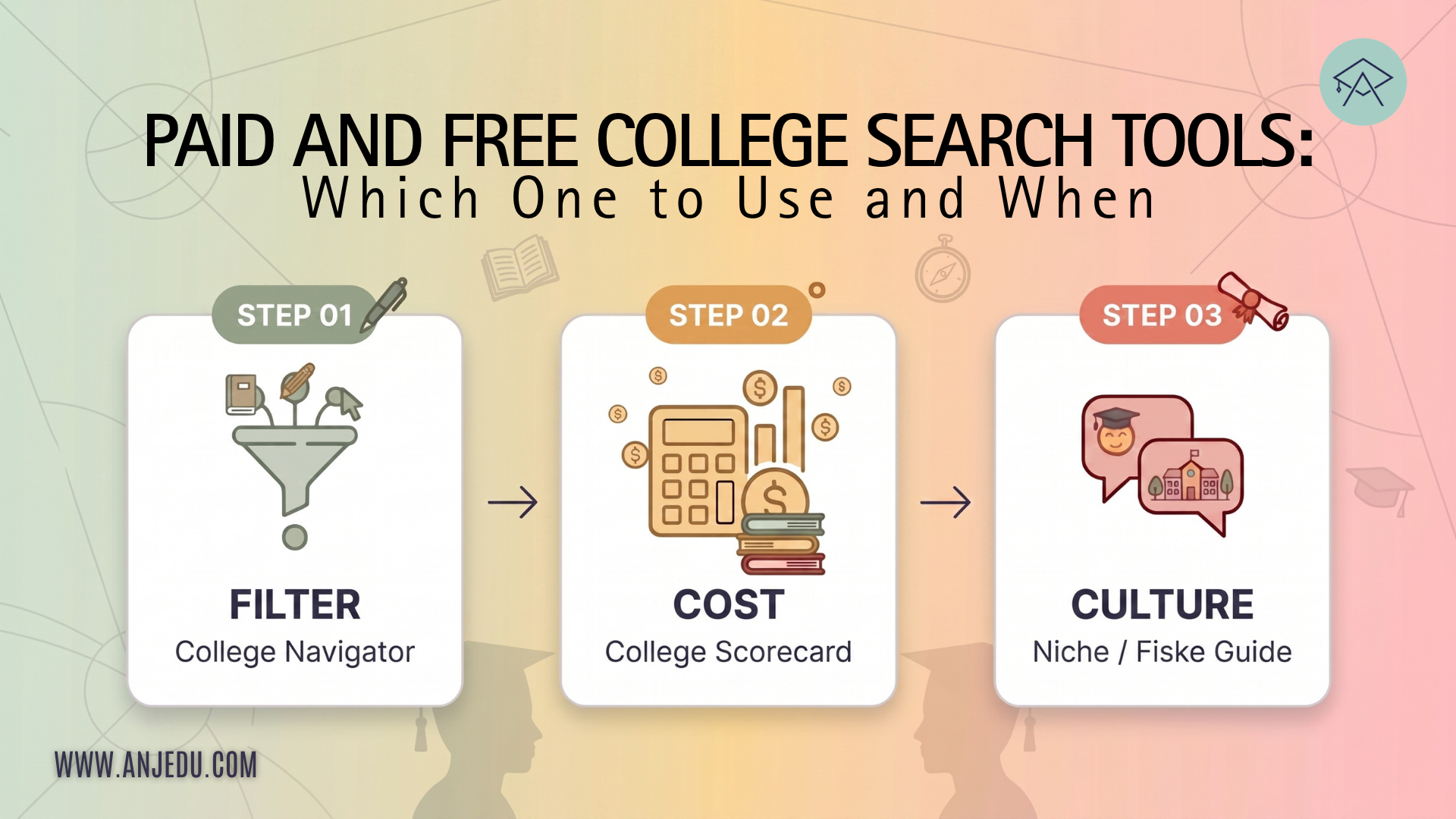
Use these tools in sequence, not simultaneously.
Filter, then cost, then culture.
Doing those jobs out of order wastes hours.
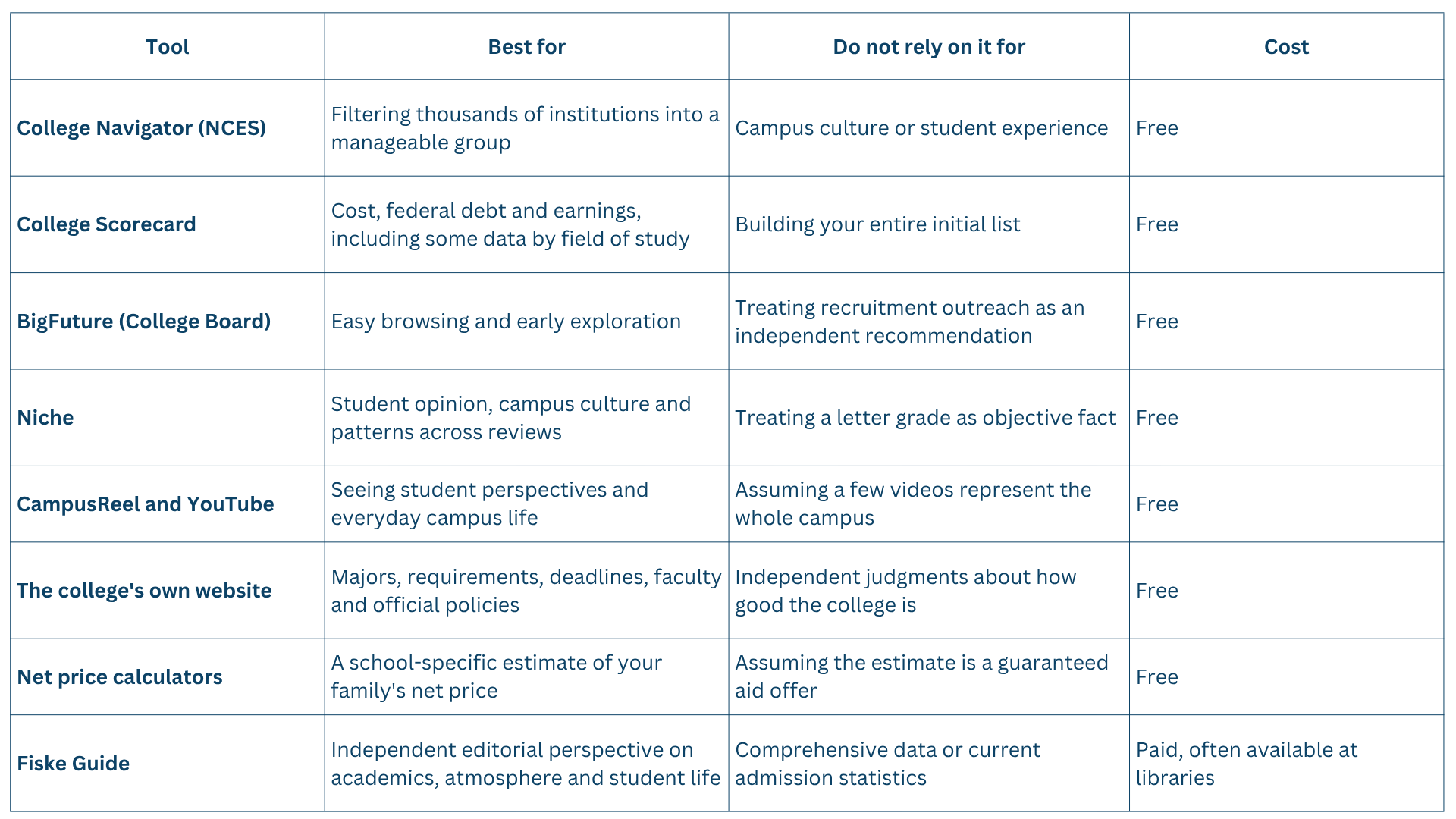
Free College Search Tools Compared
How Do You Use College Navigator?
College Navigator is run by the National Center for Education Statistics.
It looks like it was designed in 2003.
Ignore that.
It can search and compare colleges, save favorites, preserve a search session and export results into a spreadsheet. That is most of what you need from a first-stage college search tool.
Feed it the preferences your student has already sorted into must-have and would-be-nice.
Do not browse aimlessly. Filter.
Location. Pick states directly or search by distance from a ZIP code if staying within a certain radius matters.
Programs and majors. Select the subjects your student is considering. There is little reason to spend hours researching a college that does not offer what your student wants to study.
Treat this as a first pass, though. Program names and classifications do not always line up perfectly, and majors change. Verify the current program on the college's own website before making a final decision.
Degree level. Focus on bachelor's-degree programs if you are building a traditional four-year college list.
Institution type. For most families building a traditional four-year college list, that will mean public institutions and private nonprofits. Consider a for-profit institution only if you have a specific reason to do so and have researched its outcomes and costs carefully.
Size. Enter your preferred undergraduate enrollment range, but give yourself some room. These filters are literal. A college that misses your cutoff by a few hundred students may disappear even if it would otherwise be a strong fit.
Campus setting and housing. Match these to the preference work you already did. If your student wants a residential college experience, confirm that on-campus housing is available and then investigate how long housing is guaranteed.
Admission rate. We prefer to run this one tier at a time.
Two filters deserve extra care.
First, do not eliminate colleges solely on published tuition.
Sticker price matters, particularly for families unlikely to qualify for much institutional aid. But it does not tell you what many families actually pay after grants and scholarships. A private college with a much higher published price can sometimes have a lower net price than an out-of-state public university.
Cost comes later, using better tools.
Second, consider running the admission-rate filter tier by tier: likely schools first, then targets, reaches and lotteries.
One enormous search can produce an unmanageable pile. Searching by tier makes it easier to save the strongest candidates and starts organizing the list into the shape a balanced college list eventually needs.
When you are done, save your favorites and export your results.
At this stage you are aiming for a research pool, not your final application list. Roughly twenty candidates is a reasonable starting point for many students.
College Scorecard vs. BigFuture: Which Should You Use?
These two tools get compared constantly because both are free and both let families research colleges.
They are built for different purposes.
College Scorecard
College Scorecard is run by the U.S. Department of Education.
Its distinguishing feature is outcomes data: what former students earn, how much federal student debt borrowers carry and how those figures differ across institutions.
Even more useful, some earnings and federal loan-debt data are available by field of study rather than only for the institution as a whole.
That matters.
An engineering graduate and a psychology graduate from the same university may enter very different labor markets. Looking only at one university-wide earnings number can hide those differences.
There is an important limitation.
College Scorecard's earnings and field-of-study federal debt data are based on students who received federal Title IV financial aid. They therefore do not necessarily represent every graduate from a particular program.
The data also lag by necessity. The government cannot report meaningful post-college earnings until students have had time to leave school and enter the workforce.
Use Scorecard after College Navigator, once you have candidates, to investigate the financial outcomes associated with a particular field at a particular institution.
Do not treat the numbers as a forecast of what your child personally will earn.
BigFuture
BigFuture is run by the College Board, the organization behind the SAT and AP program.
For many students, it is the most approachable of these tools. It offers college search, quizzes, career exploration and a cleaner interface built for students rather than researchers.
Two things are worth understanding.
First, BigFuture college profiles are populated primarily with information colleges provide through the College Board's annual data-collection process, along with some information from government sources.
That does not mean the information is inaccurate. It means important dates, programs, policies and costs should still be confirmed with the college itself.
Second, BigFuture connects with College Board's optional Student Search Service.
Students who opt in allow qualifying nonprofit colleges, nonprofit scholarship providers and government educational agencies to use certain information to identify and contact students who may fit what they are looking for. Participating organizations generally pay College Board a licensing fee to use the service.
Student Search is optional, and students can opt out.
College Board says Student Search does not provide participating organizations with students' phone numbers or actual test scores, although organizations can search using score ranges and other information students have chosen to share.
There can be benefits. Students may discover colleges or scholarship programs they had never considered.
There is also a practical consequence: once a student joins recruitment services like this, expect substantially more college email and mail.
Much of it will sound personal.
That does not mean a college has evaluated your student's application or decided that your child is unusually likely to be admitted.
The short version:
BigFuture for exploration.
College Navigator for filtering.
College Scorecard for outcomes.
If you only use one for building the initial list, we would start with College Navigator.
Which Free Tools Tell You What a College Is Actually Like?
Filtering finds colleges that match numbers.
It cannot tell you whether your student will enjoy living there.
Several sources can help close that gap, and the notes you take during this research can become useful raw material later when your student has to explain why a particular college fits them.
Niche
Niche combines public data with large numbers of student and alumni reviews and survey responses.
Use it for patterns.
Look at the overall report card, individual categories, student polls and written reviews.
Do not treat the letter grade as a fact about the college. It is a composite created from Niche's methodology, weighting a mix of quantitative data and user responses.
Instead, dig underneath it.
If students repeatedly describe a campus as collaborative, highly competitive, politically active, quiet on weekends or dominated by Greek life, that pattern is worth investigating.
Pay attention to sample size. A result based on a small number of responses deserves more caution than one supported by hundreds.
And be careful with individual reviews.
Online reviews naturally attract people who have unusually strong opinions, positive or negative. You are looking for recurring themes, not one student's story.
CampusReel and YouTube
Student-created videos can show aspects of campus life that do not appear in a polished admissions presentation.
Search for dorm tours, dining halls, classroom buildings, weekend life, student organizations and "day in the life" videos.
But treat video as anecdotal evidence.
One enthusiastic student with a camera does not tell you what 20,000 students experience.
Look across several students and several years when possible.
The College's Own Website
Free, obvious and consistently underused.
This is where you should verify the facts.
Search the requirements for the intended major. Look at required courses and electives. Check which electives are actually being offered. Read faculty biographies and see what people in the department are researching.
Then repeat the process across several colleges.
Real differences emerge quickly.
College websites are also the authoritative place for current deadlines, admissions policies, housing information and program requirements.
Separate those facts from the marketing language.
A college telling you that it offers a particular major is useful information.
A college telling you that it provides a "transformative, world-class student experience" is advertising.
You can often find information more quickly by searching Google for a college name plus the exact topic you want rather than relying only on the institution's internal search tool.
The Fiske Guide
One paid resource earns a place alongside the free ones.
The Fiske Guide to Colleges is independently edited and draws on student and administrator questionnaires, campus visits and additional research to provide an outside perspective on academics, student life and campus atmosphere.
It does not cover every college in the country, so it cannot replace Navigator or Scorecard.
But for the colleges it does cover, it can add context that databases do not.
Check your public library before buying it.
Which Free Tools Tell You What College Will Actually Cost?
None of the general search tools can tell you exactly what your family will pay.
And published tuition alone is not enough.
Start With Each College's Net Price Calculator
Most colleges participating in federal student-aid programs and enrolling first-time, full-time undergraduates are required to provide a net price calculator.
The calculator asks for information about your family's circumstances and estimates what a student similar to yours might pay after grants and scholarships.
Run it for every serious candidate.
But understand what the result is.
It is an estimate, not a financial-aid offer.
The college's eventual aid calculation can differ, and merit scholarships are not handled equally well by every calculator.
Still, it is the best school-specific estimate available before you receive an actual financial-aid package.
And the results can be surprising.
A college with a high sticker price can sometimes cost less after aid than an institution that looked cheaper initially.
College Scorecard's Net Price Data
College Scorecard provides average net-price information, including figures broken down by income range.
That is useful for quick comparisons before you invest time in individual calculators.
But averages describe groups of students, not your family.
Use them to identify schools worth investigating, then use the college's own calculator.
Merit-Aid Behavior
Some colleges use institutional merit scholarships aggressively to recruit students they want.
Others receive enough demand that they have little reason to offer large merit discounts.
Jeff Selingo's Buyers and Sellers framework is useful for understanding that distinction.
His current list is explicitly designed as a rough guide rather than a guarantee. Among the factors to examine are:
- Admission rate
- The share of institutional aid awarded without regard to financial need
- Yield, meaning the percentage of admitted students who enroll
Lower yield can sometimes signal that a college has to work harder to persuade admitted students to enroll. But yield by itself does not predict whether your student will receive a scholarship.
The strongest evidence is the college's actual merit-aid behavior.
Look at how much non-need-based institutional aid it awards, how many students receive it, published scholarship programs and whether your student's academic profile is unusually strong relative to the college's enrolled class.
If merit scholarships are in your must-have column, this research is not optional.
Which College Search Tools Should You Be Careful With?
Not everything free is neutral, and not every number deserves equal weight.
Sites That Require Contact Information Before Showing Useful Results
Before handing over a phone number or email address, find out how the site makes money and whether your information may be used for recruitment or lead generation.
Free is not necessarily bad.
But understand the exchange.
Ranking Sites Used as College-Matching Tools
Rankings measure whatever the publisher chooses to measure.
For example, peer assessment accounts for 20% of the current U.S. News Best Colleges methodology. College presidents, provosts and admissions deans are asked to assess peer institutions.
That tells you something about institutional reputation.
It does not tell you whether your student will find a mentor, enjoy the campus, get into the classes they want or receive enough financial aid to attend.
Use rankings as one input, never as the spine of the college list.
Sponsored Placement
College-search companies may sell advertising, recruitment services or sponsored visibility.
Look for terms such as sponsored, featured or promoted.
A sponsored result is not necessarily a bad college.
It simply means placement should not be interpreted as independent evidence that the school is a particularly strong fit for your student.
AI Without Sources
AI can be extremely useful for generating questions, comparing possibilities and organizing a college search.
It can also produce outdated or incorrect admission rates, scholarship amounts, deadlines and policies.
Any number or deadline your family intends to act on should be checked against the college's current website or an authoritative federal source.
The same principle applies to our own tools. AskAnji uses our admissions methodology, but we would still tell a family to verify a scholarship deadline before relying on it.
What Order Should You Use These Tools In?
Sequence matters more than which website you like best.
This is the order we use.
- Sort preferences first.
Before opening a search tool, identify what is a must-have, what would be nice, what does not matter and what is an absolute no.
- Filter in College Navigator.
Work through the admission-rate tiers and create a research pool of roughly twenty candidates.
Export them to a spreadsheet.
- Check financial fit.
Look at likely merit behavior, College Scorecard net-price data and each college's net price calculator.
Cut schools that clearly cannot work financially before spending hours researching them.
- Research academics and culture.
Use Fiske, Niche, student video and the college's own website.
Rate each college as you go.
- Narrow the list.
For many students, the eventual application list lands somewhere around ten to fifteen colleges, although the right number depends on the student's academic profile, admission strategy and how selective the schools are.
Everything should land in one place as you research.
Our free College List Research Tracker gives you one row per school, with space for admission rate and tier, mission, culture, first- and second-choice majors, research notes, information sessions, campus visits and an overall rating.
Get the Free College List Research Tracker
Fill it in while the browser tab is still open.
Notes reconstructed a week later are nowhere near as useful as notes written while you are actually researching the college.
And that rating column becomes extremely valuable when it is time to make the final cut.
The Ultimate College List Builder
If you want to get the work of building the initial college list off your plate, we can help.
Our Ultimate College List Builder creates a customized list of approximately 20 to 30 colleges based on your student's academic profile, preferences and financial considerations.
You'll complete a detailed questionnaire covering the criteria that matter to your family. You'll also upload your student's transcript, résumé, and any relevant interest or strengths-assessment results.
Within 48 to 72 hours, you'll receive a customized college-list report.
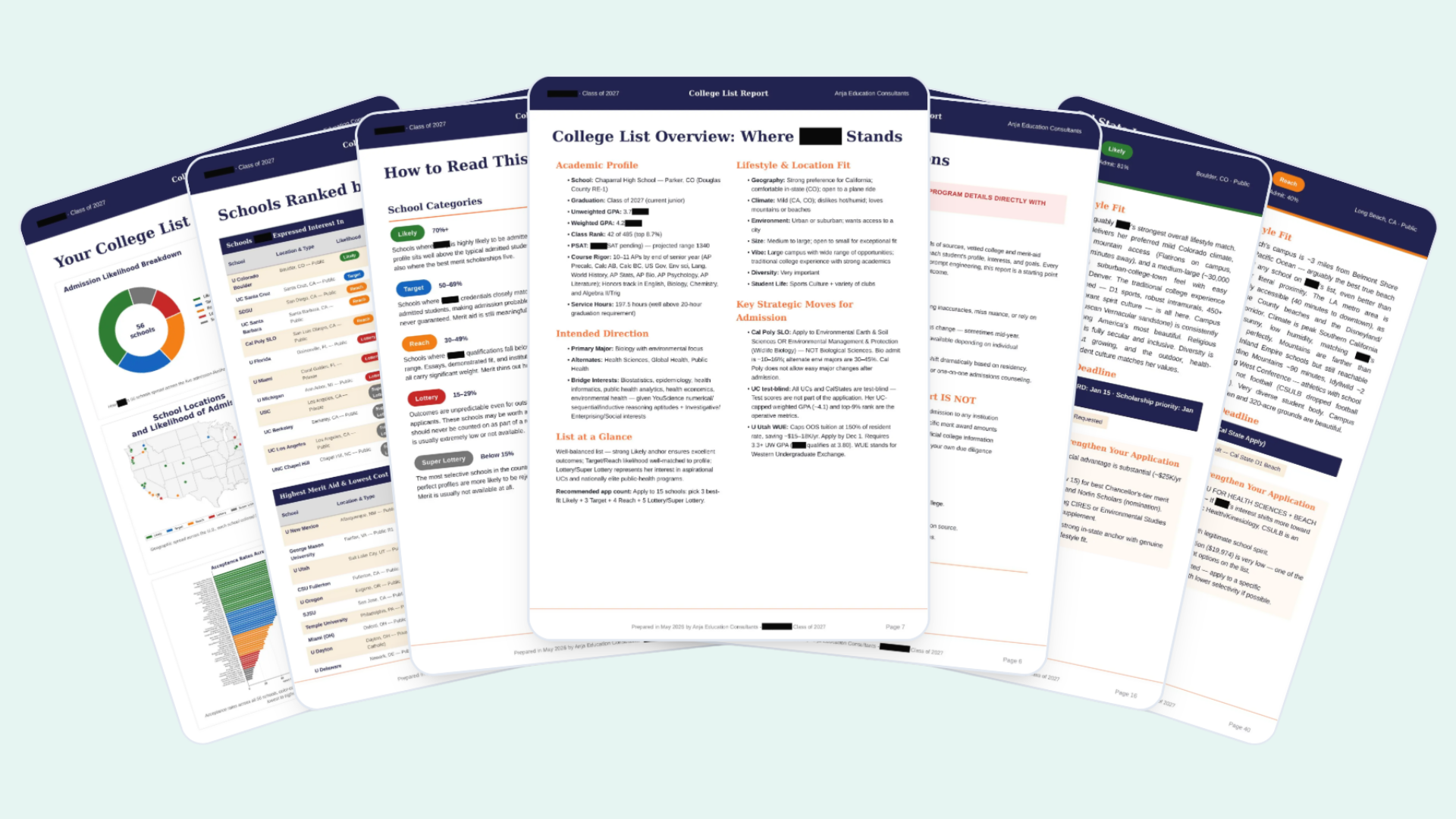
Every college is analyzed for academic and lifestyle fit.
We identify relevant merit opportunities, provide estimated scholarship ranges when reliable information is available, and flag important scholarship or application deadlines to verify with the college.
For each college, the report also identifies ways the student can strengthen the application.
And because the search begins with your student's full profile rather than a handful of obvious college names, the finished list can reveal strong options your family may not initially have considered.
We do the heavy lifting so your family can focus on deeper research, reflection and verification.
FAQs About Free College Search Tools
What is the best free college search website?
There is no single best tool because different websites do different jobs.
For building an initial list, we recommend starting with College Navigator because it offers detailed filters using federal data. College Scorecard is better for investigating cost, federal student debt and post-college earnings. BigFuture is useful for student-friendly exploration, while Niche and student videos can help you investigate campus culture.
Using several tools in sequence is more effective than trying to make one website do everything.
Is College Navigator better than BigFuture?
For systematic filtering, we prefer College Navigator.
It lets families filter schools using characteristics such as location, major, undergraduate enrollment, campus setting, housing and admission rate and then export the results.
BigFuture has a more student-friendly interface and is useful for students who are still exploring careers, majors and the kinds of colleges they might like.
Use Navigator when you know what you are looking for. Use BigFuture when you are still figuring that out.
What is the difference between College Navigator and College Scorecard?
College Navigator is primarily a college-search and institutional-data tool. Use it to identify colleges matching your criteria.
College Scorecard focuses more heavily on cost and outcomes. It can show information such as average net price, federal loan debt and post-college earnings, including some earnings and debt data by field of study.
A simple way to remember the difference is:
Navigator finds the schools. Scorecard investigates the financial outcomes.
Is BigFuture safe to use?
BigFuture itself is a legitimate College Board service.
Families should understand the separate Student Search Service, however. Students can voluntarily opt in to allow eligible nonprofit colleges, nonprofit scholarship organizations and government educational agencies to identify and contact them using certain information maintained by College Board.
Participation is optional, and students can opt out.
The important point is to make that choice intentionally rather than confusing college recruitment messages with evidence that a college has personally selected your student for admission.
Can I trust Niche college grades?
Treat them as useful summaries rather than objective judgments.
Niche grades combine public data with student and alumni reviews and survey responses. That can reveal patterns that purely statistical databases miss, particularly around student life and campus culture.
But every grade depends on a methodology that decides which factors count and how heavily to weight them.
Look underneath the grade at the actual data and student responses.
Which college search tool tells me how much a college will really cost?
Start with the college's own net price calculator.
It provides a personalized estimate based on information about your family's circumstances and what comparable students have paid after grants and scholarships.
But it remains an estimate. It is not a binding financial-aid offer, and some calculators do a better job of estimating merit scholarships than others.
Run the calculator for every serious candidate before deciding that a college is either affordable or unaffordable.
What is the best free tool for finding merit scholarships?
There is no single free tool that reliably predicts a student's merit award.
Jeff Selingo's Buyers and Sellers List is useful for identifying colleges that appear more likely to use merit aid as an enrollment tool. The Common Data Set can also show how much non-need-based institutional aid a college awards.
Then check the college's scholarship pages directly for published merit programs, eligibility requirements and deadlines.
Can I use AI to build a college list?
Yes, but do not let an unsourced AI answer become the final source of truth.
AI is particularly useful for organizing preferences, identifying possibilities, comparing schools and surfacing questions you may not have thought to ask.
Admission rates, scholarship amounts, deadlines, testing policies and program details can change from year to year. Verify those against the college's website or an authoritative government source before making decisions.
Is a paid college search tool necessary?
College Navigator, College Scorecard, BigFuture, Niche, college websites and net price calculators provide an enormous amount of information for free.
A paid resource can still save time or add useful interpretation. We particularly like the Fiske Guide for its editorial perspective on academics and campus life.
The question is not whether a resource is free or paid. It is whether it gives you information that improves the decisions you are making.
In what order should I research colleges?
Start with preferences, then filter schools, then investigate financial fit, and only then spend significant time researching campus culture and academics.
That order prevents one of the most common mistakes in the college search: falling in love with a college first and discovering afterward that it does not offer the right program, is an unrealistic admission option or cannot work financially.
The goal is not to find the website with the longest list of colleges.
It is to use the right information, in the right order, to build a list where every school has a reason to be there.
Want help turning twenty candidates into a list that produces offers? That narrowing is what we do with families every week. Book here to work through it with one of our advisors.
We're also committed to supporting all students with free resources like this article. Join our community and receive powerful tips you can apply today as you build your list and prepare your applications. From our free videos to AskAnji, our carefully curated and trained proprietary AI assistant available 24/7, we've got you covered.
Ready for the full process? Start with our guide to how to build a balanced college list. Want the research off your plate so you can focus on the applications? Sign up here for our Ultimate College List.